Exams

Get in touch
For any queries you can find the exams office in the Corporate Suite L006, call 01509 618305 or email ExamSharedMailbox@loucoll.ac.uk.
Post Result Services
Grade Boundaries
- Pearson BTEC First External Assessment Unit - Grade Boundaries - Jan 2026
- Pearson BTEC National External Assessment Unit - Grade Boundaries - Jan 2026
- Pearson T Level Core Paper - Grade Boundaries - Autumn 2025
- T Level Business - Grade Boundaries
- T Level Electrical - Grade Boundaries
- T Level Engineering - Grade Boundaries
Understanding your results
View the government guidance on your results.
Access your results
Loughborough College
- Go to the following link: www.loucoll.ac.uk/ilp
Log in with the following details:
Username Student number Password Usual college password If you need to change your college password, you can go to: your.loucoll.ac.uk
Go to the 'Personal Information' drop-down menu and select 'Exams':
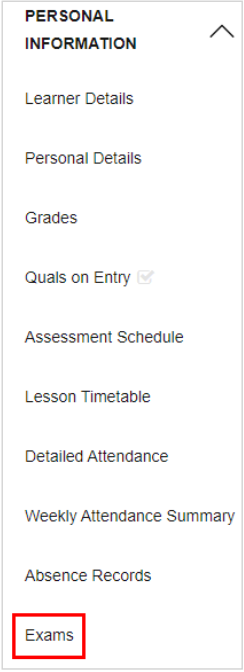
Your results will appear on this page once they are available.
Brooksby College, Stephenson College or Melton
- Go to the following link: https://intranet.smbgroup.ac.uk/ProPortal/
Log in with the following details:
Username: Student number (or charnwood\studentnumber) Password: Usual college password If you need to change your college password, you can go to: your.loucoll.ac.uk
Go to the 'Information' drop-down menu and select 'Exams':
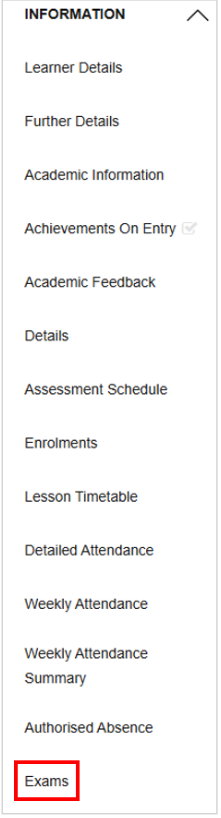
Your results will appear on this page once they are available.
WisePay
WisePay is the College's online payments system that allows you to pay for trips, visits, accommodation and any other costs via a secure online portal.
Please click the following link for more information: WisePay - Online Payments.